Earlier this month, a woman in Tennessee checked her Ring doorbell camera and saw something that stopped her cold. An elderly man, 78 years old, was slowly making his way up her porch steps to deliver a Starbucks order — bent slightly under the weight of it, holding the railing for balance. She posted the clip. Four million people watched it. A GoFundMe raised over $500,000 to help him retire.
What most people saw was a story about kindness. What caregivers saw was something else entirely: a reminder of how much can happen at a front door, and how much a video doorbell for elderly parents can tell you without your parent having to do anything at all.
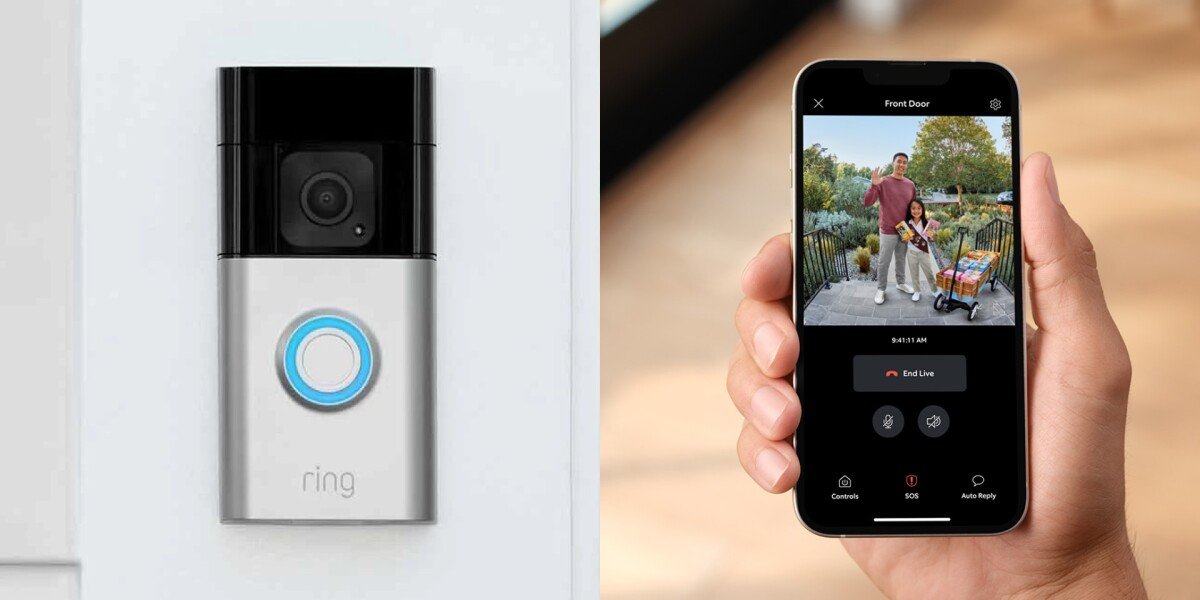
A Ring doorbell doesn’t require your mom to answer her phone or remember to check an app. It just works — you get the alert, you see who’s there, and if something looks wrong, you can talk through the speaker from anywhere in the world. Here’s how to set one up for your parent, and which model actually makes sense for an elderly household.
Why a Video Doorbell Makes More Sense Than You’d Think for Seniors
The front door is one of the biggest vulnerability points for elderly parents living alone. Scammers and solicitors target seniors at home during daytime hours. A parent with mobility issues shouldn’t be rushing to the door — that’s exactly when falls happen. And for adult children who can’t be there in person, not knowing who’s coming and going creates a specific kind of background anxiety that doesn’t go away.
A video doorbell solves all three of those problems without asking your parent to change a single habit. They still answer the door the same way they always have. The difference is that you can see everything from your phone, talk through the camera if needed, and your parent can see who’s there before opening the door — from the couch, without moving.
Ring Video Doorbell — See and Speak to Visitors From Any Phone, Anywhere
Philadelphia’s city government recently distributed 1,000 Ring devices to adults over 60 specifically because of the safety and peace-of-mind benefits. As Dr. Najja Orr, President of Philadelphia Corporation for Aging, put it: “Ring’s mission is to make neighborhoods safer — and sometimes it is literally just knowing what’s going on around your home.”
The One Setup Trick That Makes Ring Work for Elderly Parents
Most families make one mistake when buying a Ring doorbell for a parent: they set it up on the parent’s phone only. That’s the wrong move.
Your parent doesn’t need the app. You do. Set up the Ring account on your own phone, link it to the doorbell at their house, and you receive every notification directly — motion alerts, doorbell rings, the works. Your parent just uses the door like always. You have full visibility from wherever you are.
This is how it actually works in practice: a family member in another state gets an alert when someone rings the doorbell. They open the app, see a contractor at the door, press the microphone button, and say “Hi, my mom is on her way.” The contractor hears it through the speaker on the doorbell. The parent never touched her phone. That’s the setup worth aiming for.
Ring Video Doorbell (Battery) — Best Overall for Elderly Households
The standard battery Ring doorbell is the right starting point for most elderly households because it doesn’t require any wiring. No electrician, no drilling into existing doorbell wires — you mount it on the door frame, charge the battery every few months, and it works. For parents in rentals or older homes with no existing doorbell wiring, that flexibility matters.
It records in 1080p HD, has two-way audio with a built-in microphone and speaker, detects motion before anyone even rings the bell, and works with Alexa. If your parent has an Echo Show in the living room, the camera feed can pop up on the screen automatically when someone’s at the door — no phone, no app, no fumbling.
Ring Video Doorbell (Battery) — 1080p HD, Two-Way Audio, Works With Alexa
Promising review: “Set this up for my 81-year-old father who lives alone. I linked it to my phone, not his. I get every notification. He just answers the door the same way he always did. It’s been six months and I can tell you exactly who visits him and when. That peace of mind is worth every penny.”
Price: ~$99.99 | Optional Ring Protect plan: $4.99/month for video recording history.
Ring Video Doorbell Pro 2 — Best If Your Parent Has Existing Doorbell Wiring
If your parent’s home already has wired doorbell infrastructure, the Pro 2 is worth the upgrade. It runs on the existing wiring so there’s no battery to charge — ever. For elderly households where nobody is going to remember to bring a charger outside twice a year, that’s a practical advantage that adds up.
The Pro 2 also adds 3D motion detection and a Bird’s Eye View feature that shows a top-down map of exactly where movement happened in the yard — useful if your parent has a larger property or a long front path. The video resolution is sharper, and the night vision is noticeably better than the battery model.
Ring Video Doorbell Pro 2 — Wired, 1536p HD, 3D Motion Detection, No Battery Needed
Price: ~$249.99 | Requires existing doorbell wiring for installation.
Ring Video Doorbell + Echo Show 8 — Best Combo for Seniors Who Won’t Use a Phone
This is the setup that genuinely changes the game for parents who aren’t comfortable with smartphones. When someone rings the doorbell, the Echo Show screen in the living room automatically displays the live camera feed — no app, no phone, no notification to tap. Your parent looks at the screen, sees who’s there, and can speak directly through the Show without getting up or touching anything.
The Echo Show 8 sits on a counter or end table, always on, always ready. Combine it with the Ring doorbell and your parent gets the full video doorbell experience through a device as simple as a picture frame. This is the combination most recommended by occupational therapists for aging-in-place setups.
Amazon Echo Show 8 — Pairs With Ring Doorbell, Answers Door From the Couch
Promising review: “My mom has macular degeneration and can’t reliably use her phone. The Echo Show paired with Ring was the answer. The screen is large enough for her to see, and when the bell rings it just appears automatically. She’s answered the door from her armchair three times this week.”
Price: Echo Show 8 ~$129.99 + Ring Doorbell ~$99.99
Does Your Parent Need to Do Anything?
No — and that’s the point. The best Ring setup for an elderly parent is one where they don’t have to learn anything new. You manage the app on your phone. You get the notifications. You can see the live feed anytime you want to check in. Your parent just lives their normal life and answers the door when someone’s there.
The optional Ring Protect subscription at $4.99/month adds video recording history — meaning if something happens at the door and you weren’t watching live, you can review the footage later. For most families caring for an elderly parent alone, that’s $5/month well spent.
One Thing to Watch For: Scammer Awareness
One of the most underappreciated benefits of a video doorbell for elderly parents is scam prevention. Seniors are disproportionately targeted by door-to-door scammers — fake utility workers, charity solicitors, and home repair scams that start at the front door. With a Ring doorbell, you can monitor who’s visiting in real time. If your parent calls you saying a “gas company inspector” is at the door and you see someone in civilian clothes on the camera, you can tell your parent to not open the door before you’ve verified it’s legitimate. That intervention has prevented more than one fraud case in families using this exact setup.
For a complete home safety setup, read our guides on the 7 best smart home devices for elderly parents and best medical alert systems for aging parents living alone.
ClearlyBold.com may earn a commission from purchases made through our links. All recommendations are editorially independent.