A no-fluff breakdown of 5 smart home products — what they do, what people love, what frustrates them, and who each one is actually for
There is a lot of smart home marketing out there. What is harder to find is a clear answer to a simple question: what is this product actually like to live with, and what do real users think about it after the honeymoon period is over?
This article covers five products that come up consistently in smart home conversations — on Reddit, in Amazon reviews, and in independent testing. For each one: what it does, the features that matter, the honest pros and cons, and what the people who actually own it say.
1. Roborock Q Revo — Robot Vacuum and Mop Combo
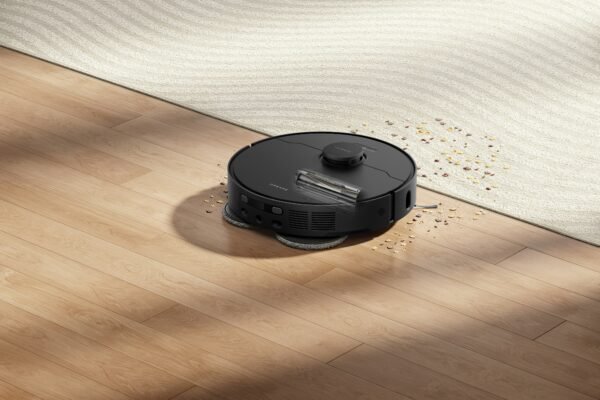
The Roborock Q Revo sits in the middle of Roborock’s lineup — below the flagship Qrevo series but significantly more capable than their entry-level models. It uses dual spinning mop pads, a self-emptying and self-washing dock, and LiDAR navigation to map and clean your home with minimal human involvement. The dock handles emptying the dustbin, washing the mop pads, drying them, and refilling the water tank — which is what makes this category genuinely different from older robot vacuums that just sucked up dust and sat there.
What it does
The Q Revo vacuums and mops in a single run. The LiDAR sensor on top creates a detailed map of your floor plan on the first run — Vacuum Wars found it mapped their test space in about five minutes with good coverage. The spinning mop pads lift automatically when the robot detects carpet, so you can run it on mixed surfaces without worrying about wet rugs. The app lets you select specific rooms, set schedules, adjust suction levels, and create virtual barriers for areas you want to exclude.
The dock is the real differentiator. After each cleaning session it empties the dustbin, washes the mop pads with clean water, runs a drying cycle, and refills the water tank for the next run. In practical terms, that means weeks of cleaning without touching the machine.
What people say
The strongest praise comes from pet owners. One reviewer who tested it for six months with two dogs described it as easily one of the best purchases they had made in recent memory, adding that the rubber roller brush handles dog hair without tangling — something cheaper models consistently fail at. The ability to select individual rooms is a feature that comes up repeatedly: users appreciate being able to clean high-traffic areas like kitchens and living rooms without running the full home.
The most common complaint is the initial setup. Modern Castle’s independent testing found that first-run mapping took several attempts before completing successfully — though they noted this may be a software issue rather than a hardware flaw, and things ran smoothly after that first setup. The dock is also noticeably taller than older Roborock models due to the larger water tanks, which can be a consideration for tight spaces.
The honest pros and cons
What works: Consistent performance on hardwood, tile, and low-pile carpet. Debris pickup that Vacuum Wars rated above average across multiple debris types. The mop pad auto-lift on carpets works reliably. The app is widely considered the best in the robot vacuum category for depth of control without being overwhelming.
What doesn’t: The main downside is the obstacle avoidance system — the absence of additional lasers found on higher-end Roborock models makes it less effective at navigating around small objects than its more expensive counterparts. Hair ties, thin cables, and small items on the floor can cause problems. The auto-empty bin is taller than previous versions, which matters for low-clearance furniture placements.
Who it’s for: Households with mostly hard floors and mixed carpet, pet owners dealing with regular shedding, and anyone who wants to stop thinking about vacuuming entirely. Not ideal for homes with heavy deep-pile carpet or floors that are regularly cluttered with small objects.
Full breakdown: We Tested 8 Robot Vacuums — These Are the Only Ones Worth It
2. Ecobee Smart Thermostat — Learning Thermostat with Room Sensors
Ecobee has been making smart thermostats since 2009, which gives them a depth of software refinement that newer entrants to the category can’t match. The current Premium model adds an air quality sensor, a zinc body, and a larger touchscreen to the feature set that made earlier Ecobee models popular — including Alexa built directly into the device, room sensors, and detailed energy reporting.
What it does
The core function is scheduling your heating and cooling around your actual life rather than a static timetable. Ecobee learns when you’re home and away, adjusts proactively, and can be controlled remotely from anywhere. The included SmartSensor detects occupancy in a specific room and tells the thermostat to prioritize comfort in occupied spaces — useful in homes where temperature varies significantly between rooms.
What distinguishes Ecobee from Google Nest is the ecosystem flexibility. At the bare minimum the Ecobee Smart Thermostat Premium is a fantastic HVAC controller — but it can also be a smart speaker, air quality monitor, alert you of a smoke alarm, be a security hub, and more. It works with Alexa, Google Assistant, and Siri, making it one of the most broadly compatible smart thermostats available.
What people say
During independent testing by Bob Vila, installation was refreshingly simple — taking about 15 minutes with clear, well-organized instructions. The thermostat connected quickly to Wi-Fi and paired smoothly with the app, which stood out for its clean layout and intuitive controls. The energy reporting is consistently praised — users appreciate being able to see actual usage trends over time rather than just current temperature.
The most cited frustration is the price. At $249.99 for the Premium, it sits at the top of the smart thermostat market. Some users also note that the remote sensor sold separately is almost essential to get the full benefit of the system, which adds to the total cost. One reviewer noted a slight wobble in the wall mount after installation — a minor issue that comes up occasionally in user feedback.
The honest pros and cons
What works: The scheduling and learning features reduce energy consumption in a measurable way — users consistently report lower utility bills. The Alexa integration built directly into the device is a genuine convenience. Room sensors are one of the most practical smart home features available for homes with uneven temperature distribution between floors or rooms.
What doesn’t: The $250 price tag requires justification. The system requires 2.4GHz Wi-Fi, which can be limiting for newer mesh networks that prioritize 5GHz. Remote sensors are sold separately and add to the cost for users who want whole-home coverage.
Who it’s for: Homeowners (not renters, given the installation requirement) who heat and cool their home regularly and want meaningful energy savings with minimal ongoing effort. Particularly useful for multi-floor homes or homes with temperature variation between rooms.
3. Oura Ring 4 — Health Tracking Ring
The Oura Ring 4 is the fourth generation of a product that essentially created the smart ring category. At $349 plus $5.99/month for the membership that unlocks most of its features, it is also the most expensive wearable on this list. It tracks sleep stages, heart rate variability, body temperature, blood oxygen, stress, and activity — turning all of it into three daily scores: Sleep, Readiness, and Activity.
What it does
The ring uses 18 optical channels and a temperature sensor to collect biometric data continuously. The Readiness Score is the feature most users engage with daily — it combines sleep quality, HRV, resting heart rate, and other signals to give you a single number indicating how recovered your body is. A high readiness score means push hard. A low one means take it easy.
Since there is no screen, you spend a considerable amount of time viewing data and metrics on the Oura app. Oura redesigned the app from the previous Gen 3, with a more intuitive home screen that shows your scores for readiness, sleep, activity and stress at a glance. Because the app keeps track of data over a stretch of time, you can also view trend reports to see things like your sleep score across weeks, months or years.
The Gen 4 improvements over Gen 3 include an 8-day battery life (up from 7), a fully titanium build, a wider size range, and recessed sensors that eliminate the bumps on the inside of older versions — making it significantly more comfortable to wear constantly.
What people say
After wearing the Oura Ring Gen 4 for over a year, one personal trainer described it as being like a quiet little coach — gently nudging toward better sleep, smarter recovery, and more mindful movement. The sleep tracking is the most consistently praised feature. Users report catching patterns they couldn’t identify on their own — how late eating affects deep sleep, how alcohol reduces REM sleep even after a single drink, how consistent bedtimes produce better sleep scores than variable ones.
The most honest criticism comes from NBC Select’s reviewer, who tested it for over a year: it’s great at wellness tracking, but not a set-it-and-forget-it solution for everyone. The subscription requirement frustrates some users — without the $5.99/month membership, the ring only shows basic daily scores. The lack of built-in GPS means workout tracking requires your phone. And the ring does not display notifications, which is either a feature or a limitation depending on your perspective.
The honest pros and cons
What works: Sleep tracking accuracy is best-in-class among consumer wearables. The form factor — a ring you wear all day and night without thinking about it — produces better data quality than a watch you take off at night. Battery life at 8 days removes the daily charging friction that makes many wearables feel like chores. Titanium build handles daily wear including water exposure without concern.
What doesn’t: The subscription model means the real cost is $349 plus $72/year — closer to $420 in year one and $72/year after. No GPS limits workout tracking accuracy. The ring is genuinely only useful for people who will act on the data it provides — for everyone else, it is an expensive source of information they already know and won’t change.
Who it’s for: People who want to understand their sleep and recovery with clinical-grade detail, and who have demonstrated they change behavior when data tells them to. Athletes managing training load, people with sleep concerns, and anyone who finds smartwatch notifications distracting but still wants health insights.
More on health tracking: How to Monitor Your Health at Home: A Practical Guide
4. Amazon Echo Show 8 — Smart Display with Alexa
The Echo Show 8 is Amazon’s mid-size smart display — an 8.7-inch screen with a built-in camera, speakers, and Alexa. It sits between the smaller Echo Show 5 and the larger Echo Show 10, and for most people represents the right balance of screen size, sound quality, and price. The 2025 fourth-generation update refreshed the display, improved the camera to 13 megapixels, and added better audio with spatial sound.
What it does
As a hub: it controls smart home devices, sets alarms and timers, plays music, answers questions, runs routines, and shows security camera feeds. As a communication device: it makes video calls to other Echo Show users, smartphones (through the Alexa app), and now supports Zoom. As an ambient display: it shows the time, weather, calendar, and photo slideshow when idle — replacing the blank wall or countertop it sits on with something genuinely useful.
The combination of screen and voice changes how you interact with the device compared to a screenless Echo. You can see recipes while cooking, watch the front door camera without pulling out your phone, have a video call on a large-ish screen without propping up a laptop, and manage your morning routine by looking at the screen rather than asking for each piece of information verbally.
What people say
The kitchen is the most common placement by far, and the praise from that use case is consistent. Users appreciate having hands-free control while cooking, being able to glance at a recipe on a real screen, and using the video call feature with family without setting up a laptop or holding a phone. The photo slideshow feature — where the screen cycles through family photos when idle — is mentioned repeatedly as something users didn’t expect to value as much as they do.
The camera quality improvement in the 2025 model is well-received. Earlier Echo Show 8 models were criticized for low-resolution cameras that made video calls look grainy. The 13-megapixel upgrade addresses this directly. The main ongoing criticism is Alexa’s limitations compared to Google Assistant on complex queries — it handles smart home commands exceptionally well but struggles more with nuanced questions.
The honest pros and cons
What works: Smart home control through a screen is genuinely better than voice-only — you can see device status, control multiple devices visually, and get confirmations at a glance. The ambient display mode turns a countertop device into something that provides value passively, not just when you’re actively using it. Video call quality on the 2025 model is solid enough to replace laptop calls for casual family conversations.
What doesn’t: Alexa’s general knowledge and conversational AI trails Google Assistant. The device pushes Amazon content and promotions through the interface, which some users find intrusive. Privacy-conscious users should be aware that the camera faces outward at all times — there is a physical shutter, but it requires manual use.
Who it’s for: Alexa ecosystem households who want a screen in the kitchen or living room. People who make regular video calls to family. Anyone who wants a smart home control center that is more visual and intuitive than a speaker alone.
Full review: Echo Show 8 Review — Is It Worth It?
5. Govee RGBIC Floor Lamp — Smart Ambient Light
The Govee RGBIC floor lamp is the best-selling smart floor lamp on Amazon, with over 10,000 reviews averaging 4.5 stars. RGBIC means different sections of the lamp can display different colors simultaneously — creating gradients rather than solid single colors. At $59–$69, it sits at a price point where almost anyone considering smart lighting can justify trying it.
What it does
At its simplest: it replaces your floor lamp with one that you can control by voice, phone, or schedule. At 1,000 lumens, it is bright enough to serve as the primary light source in a medium-sized room rather than just an accent. The RGBIC technology produces color gradients that shift across the lamp’s height — giving it a more designed, less flashy appearance than standard RGB lights that show only one color at a time.
It connects to the Govee Home app, works with Alexa and Google Home, and includes 85 preset scenes. The music sync feature uses a built-in microphone to pulse the colors in rhythm with audio playing in the room. Setup involves plugging it in, downloading the app, and connecting to Wi-Fi — which typically takes under 10 minutes.
What people say
The pattern in reviews is consistent: people buy it for the color features and keep it for the warm white lighting. The most common setup described is warm white at 40–50% brightness, placed in a corner, used as the primary evening light. Users describe the room feeling completely different — warmer, more relaxed — compared to overhead lighting. One frequently quoted Amazon review describes using the warm white mode daily and only activating the color features when hosting guests.
The music sync feature gets genuinely positive reviews from users who entertain at home, with people describing it as making their living room feel like a venue during gatherings. The practical complaints are minor: the app has occasional connectivity issues, and the light strip at the base is not adjustable in position, which limits some placement configurations.
The honest pros and cons
What works: The price-to-impact ratio is among the best in smart home tech. At $60, it is the cheapest device that produces an immediately visible change in how a room feels. The warm white mode at moderate brightness is genuinely superior to overhead lighting for evening use. Voice control through Alexa or Google means you never have to find the physical switch. Integration with smart home routines — turning on automatically at sunset, dimming at 10pm — adds to the daily utility.
What doesn’t: The base strip is fixed, which limits placement flexibility. The app occasionally loses connection and requires relaunching. The physical power switch is at the base of the lamp rather than at a reachable height, meaning the first time you set it up you will want to immediately configure voice or app control so you never have to touch the base again.
Who it’s for: Anyone who spends evenings in a living room lit by overhead lighting and has never experienced the difference a well-placed floor lamp makes. People setting up their first smart home who want an immediate, visible payoff for under $70. Households that entertain and want lighting that responds to music or moods without complicated setup.
See also: The Lamp That Changed My Living Room (Under $60 on Amazon)
The common thread
All five products above come up repeatedly in smart home discussions for the same reason: they deliver on what they promise in a way that most smart home products don’t. The robot vacuum cleans. The thermostat saves energy. The ring tracks sleep accurately. The display makes the kitchen more useful. The lamp changes how a room feels. None of them require ongoing maintenance of the relationship between you and the device — they just work.
That reliability is rarer than it sounds in a category full of products that impress in demos and disappoint in practice. It is also, more than anything else, what makes something worth recommending.
ClearlyBold.com may earn a commission from purchases made through our links at no extra cost to you. All recommendations are editorially independent.